

Overview
The Onboarding Checklist is a dedicated page in the Momentum admin app that brings every new-org setup step into one shareable view. Instead of bouncing between the admin app, the user web app, and multiple integrations pages, Org Admins and Editors can see the status of every required integration, invite their team, and activate starter workflows from a single location. This page is designed to:- Give new customers one shareable URL they can return to during setup.
- Provide a clear, at-a-glance view of what is connected and what still needs attention.
- Enable self-serve configuration for the most common onboarding tasks.
Prerequisites
To use the Onboarding Checklist, you must be signed in as an Organization Admin or Editor. See User Roles and Permissions for details on these roles.Accessing the Onboarding Checklist
- Sign in to the Momentum admin app at app.momentum.io.
- Open the Settings tab in the left-hand navigation.
- Select Onboarding Checklist. You’ll be redirected to the
/admin/onboardingroute.
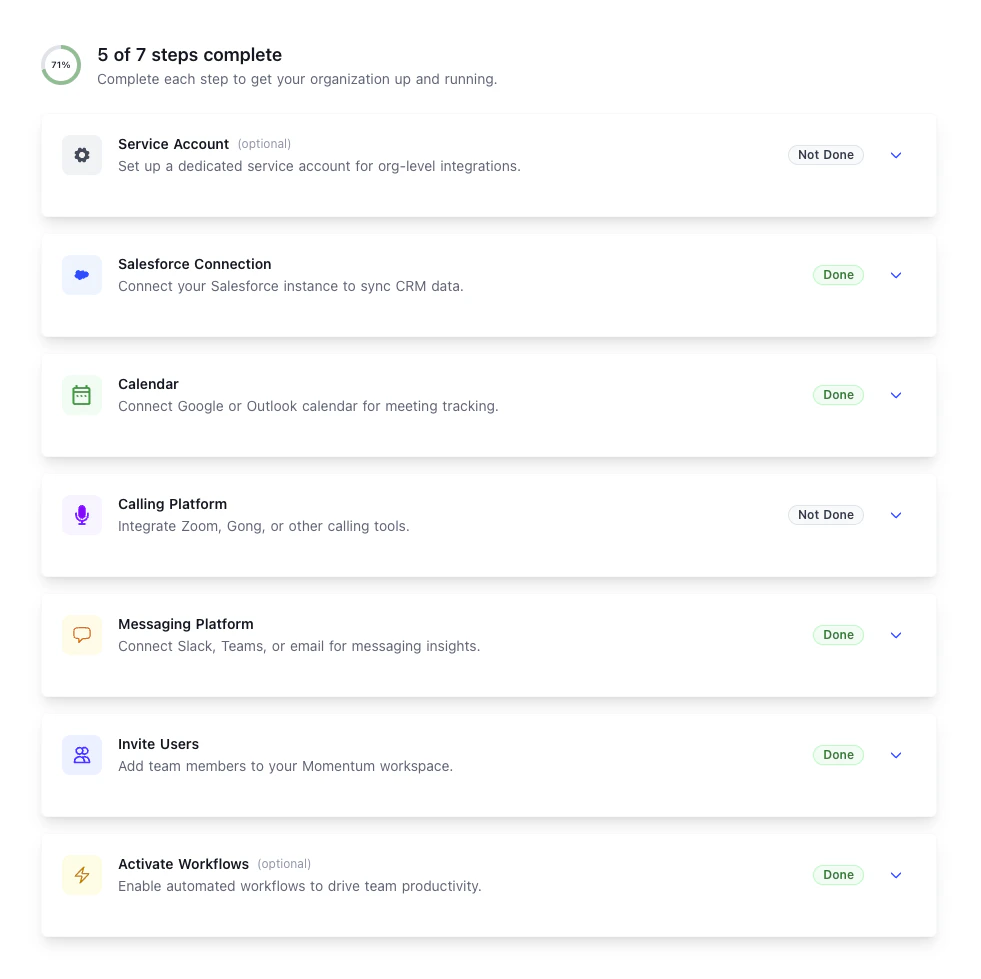
Checklist Steps
The Onboarding Checklist surfaces each setup step as a card, along with its current status. Steps can be completed in any order, and the checklist will update automatically as integrations are authorized or users are invited.Service Account
Configure a dedicated service account for org-level integrations. Using a service account keeps org-wide connections stable and independent of any single user’s credentials or license.Salesforce Connection
Connect your Salesforce instance so that Momentum can sync CRM data, map calls to opportunities, and power deal-focused workflows. For deeper detail on authorizing Salesforce, see Step 3 of the Installation Guide.Calendar
Connect a calendar provider so Momentum can track scheduled meetings, join calls as needed, and associate recordings with the right events. Available options:- Google Calendar
- Microsoft Outlook Calendar — see Microsoft Outlook Integration
- Google Drive
Calling Platform
Connect your video conferencing and dialer tools so Momentum can ingest calls from the platforms your team already uses. Video conferencing and conversation intelligence- Zoom — see Zoom Integration
- Gong — see Gong Integration
- Clari Copilot — see Clari Copilot Integration
- Chorus — see Chorus Integration
- Dialpad — see Dialpad Integration
- Aircall — see Aircall Integration
- CloudTalk — see CloudTalk Integration
- Orum — see Orum Integration
- Vonage — see Vonage Integration
- RingCentral — see RingCentral Integration
Messaging Platform
Connect the messaging tool your team uses to receive call summaries, signals, and other Momentum notifications. Available options:- Slack
- Microsoft Teams — see Microsoft Teams Integration
- Email (via Microsoft Outlook) — see Microsoft Outlook Integration
Invite Users
Invite teammates to Momentum directly from the checklist by sending email invitations. You can also manage previously invited users from this step. For an overview of which role to assign, see User Roles and Permissions.Activate Workflows
Enable templated workflows so your team starts receiving value immediately after setup. The checklist includes starter templates for:- AI Meeting Summary — see Setting Up Call Summaries.
- Deal Risk Smart Clips — see Signals, Clips & Tags.