

Overview
Smart Quarantine automatically screens meeting transcripts for sensitive content before Momentum generates and distributes AI summaries, action items, and insights. When a meeting is flagged, processing is paused and the meeting host is notified via Slack to decide what happens next. This ensures that confidential discussions — such as personnel matters, legal proceedings, or non-public financial information — are never inadvertently shared across your organization through Momentum’s automated workflows.Prerequisites
- Smart Quarantine must be enabled for your organization by your Momentum representative.
- Meeting hosts must have Slack connected to Momentum to receive quarantine notifications and take action.
- An AI license is required to use this feature.
Key Benefits
- Prevent accidental exposure of sensitive meeting content before it reaches summaries, CRM syncs, or team feeds
- AI-powered detection goes beyond keyword matching to understand context, intent, and confidentiality
- Zero manual effort — meetings are automatically screened without any action required from reps or hosts
- Host stays in control — flagged meetings are paused until the host explicitly chooses how to proceed
What Gets Flagged
Momentum’s AI evaluates meeting transcripts for sensitive content across the following categories:Smart Quarantine uses contextual understanding — not simple keyword matching.
A sales rep mentioning a competitor’s recent acquisition in a deal call will
not trigger quarantine. An executive discussing confidential acquisition
targets with non-public details will. The AI considers participant roles,
meeting context, and whether the information discussed is likely non-public
before flagging.
What Does NOT Get Flagged
Routine business conversations are not flagged, including:- Standard sales calls, competitive analysis, and market positioning
- General company financial performance discussed in earnings calls or QBRs
- Contract terms, compliance training, and policy briefings
- Routine team meetings such as standups, sprint planning, and project updates
- Public information about acquisitions or financial matters
How It Works
1. Automatic Screening
After a meeting is imported and the transcript processing begins, Momentum’s AI analyzes the full conversation for sensitive content. This happens automatically — no configuration or manual action is needed from your team. Only meetings where the AI has high confidence that sensitive content is present are flagged. Ambiguous or low-confidence signals are not flagged, ensuring minimal disruption to your normal workflow.2. Processing Is Paused
When a meeting is flagged, all downstream processing is immediately paused. This means:- No AI summary or action items are generated
- The meeting is not indexed in the Call Library
- No data is synced to your CRM
- No Autopilot or AI Signal workflows are triggered
3. Host Is Notified via Slack
The meeting host receives a Slack direct message explaining that the meeting has been flagged. The notification includes:- The meeting title
- A brief reason explaining why the meeting was flagged
- Three action buttons to resolve the quarantine
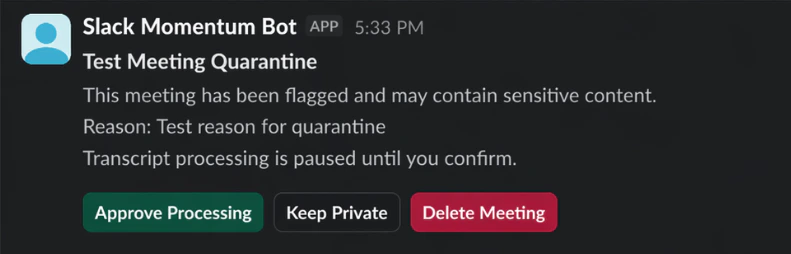
There is no timeout on quarantine notifications. The meeting will remain
paused until the host responds, so hosts can take action at their convenience.
Best Practices
- Educate meeting hosts — Let your team know that they may receive quarantine notifications via Slack and what each action means
- Connect Slack — Ensure all meeting hosts have Slack connected to Momentum so they can receive and respond to notifications promptly
- Review flagged meetings — When a meeting is flagged, hosts should review the stated reason before choosing an action
- Use “Keep Private” for legitimate but sensitive calls — If a meeting contains sensitive content that still needs to be documented, “Keep Private” lets processing continue with restricted access rather than deleting the record entirely