> ## Documentation Index
> Fetch the complete documentation index at: https://docs.momentum.io/llms.txt
> Use this file to discover all available pages before exploring further.
# Integrating Outreach with Momentum AI
Momentum connects to your Outreach account to automatically ingest call recordings and metadata into Momentum's Call Library. These calls are processed like any other source in Momentum: summarized, analyzed, and made searchable.
## Prerequisites
You'll need Outreach administrator access and a Momentum admin account.
Ensure users exist in both systems with matching work emails.
* Momentum workspace permissions to install and manage integrations.
* Outreach Voice enabled: Your Outreach account must have Voice/Dialer functionality enabled.
## Outreach Configuration
### Enable Call Recording
To ensure Momentum can access your call recordings:
1. Sign in to your Outreach Admin Portal
2. Navigate to **Administration → Org Info → Voice**
3. Enable call recording for the desired users or teams
4. Ensure users have the appropriate voice recording permissions
Only calls with recordings will be imported into Momentum. Calls without recordings, or calls in "ringing", "no\_answer", or "canceled" states are automatically excluded.
### Salesforce Sync for Prospects
For optimal call attribution in Momentum, ensure your Outreach prospects are synced from Salesforce:
* In Outreach, navigate to Administration → Integrations → CRM
* Select your Salesforce integration
* Verify that prospect sync is enabled
## Connect Outreach to Momentum
Outreach uses OAuth 2.0 authentication. To connect:
**From the Momentum web app:**
1. Click on your profile icon and select **Integrations**.
2. Find the Outreach integration from **Browse integrations** and click **Sign in**.
**From Slack:**
1. Type `/configure` to open Momentum's Integrations menu.
2. Find the Outreach integration and click **Authorize**.
**Complete the authorization:**
1. You'll be redirected to Outreach to authorize the connection.
2. Sign in with your Outreach account.
3. Review and approve the requested permissions.
4. When connected, the status will show as **Connected**.
Your integration is now complete!
Momentum requests read-only access to your Outreach calls, prospects, and users. No data is written back to Outreach.
## Where to Find Calls
Open the **Call Library** in Momentum to browse and search Outreach calls.
## Assign AI License Seats
To enable Outreach call sync for users:
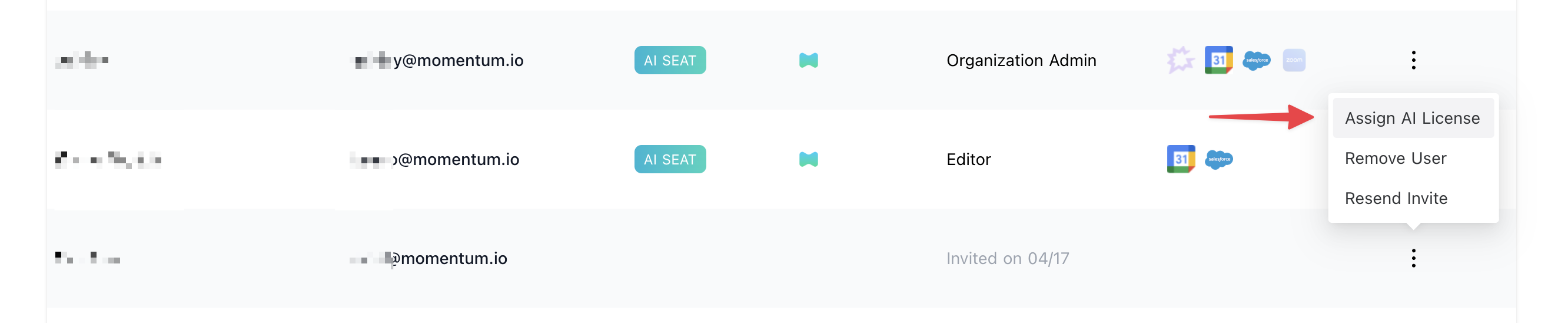
1. Log in to the [Momentum admin](https://app.momentum.io/admin/team) page.
2. In the **Team** section, invite or locate users to license.
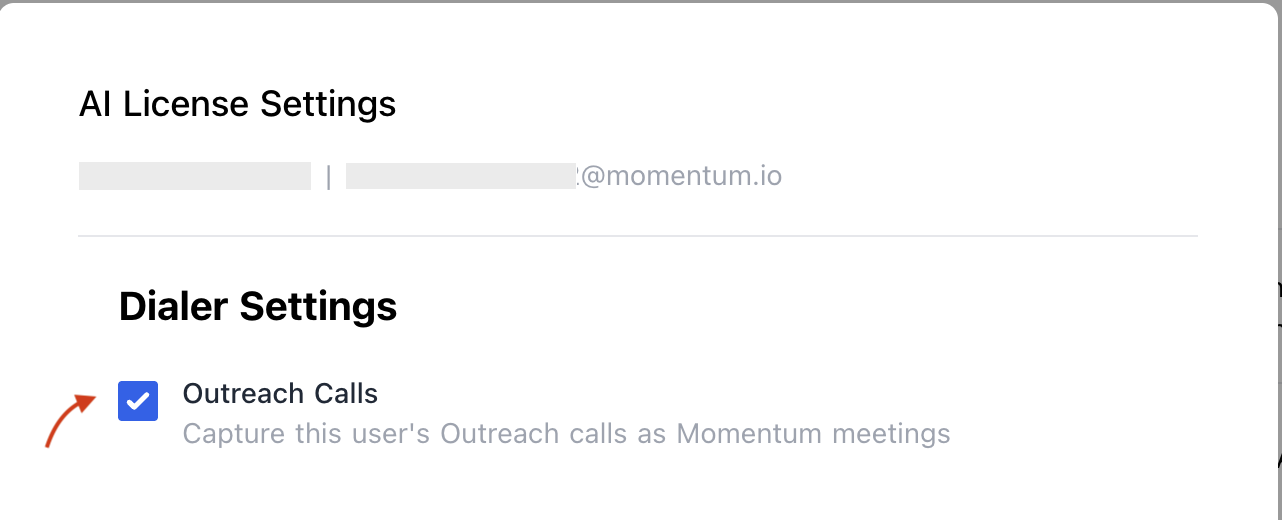
3. Click **Assign AI License** for each user.
4. Enable **Outreach calls** to sync that user's calls.
 ## Troubleshooting
* Calls may be missing if:
* Call recording is not enabled for that user
* The call state is "ringing", "no\_answer", or "canceled".
* The call has no associated prospect
* Allow up to 15 minutes for the next sync cycle.
If you encounter issues, contact our support team:
* Slack: Use your shared Momentum channel
* Email: [support@momentum.io](mailto:support@momentum.io)
## FAQs
By default, ingestion starts after connection. Contact Momentum support for historical backfill requests.
Every 15 minutes.
## Troubleshooting
* Calls may be missing if:
* Call recording is not enabled for that user
* The call state is "ringing", "no\_answer", or "canceled".
* The call has no associated prospect
* Allow up to 15 minutes for the next sync cycle.
If you encounter issues, contact our support team:
* Slack: Use your shared Momentum channel
* Email: [support@momentum.io](mailto:support@momentum.io)
## FAQs
By default, ingestion starts after connection. Contact Momentum support for historical backfill requests.
Every 15 minutes.