> ## Documentation Index
> Fetch the complete documentation index at: https://docs.momentum.io/llms.txt
> Use this file to discover all available pages before exploring further.
# Integrating Aircall with Momentum AI
Momentum connects to your Aircall account to automatically ingest call recordings and metadata into Momentum's Call Library. These calls are processed like any other source in Momentum: summarized, analyzed, and made searchable.
## Prerequisites
You'll need Aircall administrator access and a Momentum admin account.
Ensure users exist in both systems with matching work emails.
* Momentum workspace permissions to install and manage integrations.
* Calls must have recordings available and accessible in Aircall.
* Salesforce integration recommended: One of the following Aircall Salesforce packages should be installed for optimal call attribution:
* Aircall for Sales Engagement (V4) – Recommended. Includes Aircall Voice custom object (`aircall2gp__Aircall_Voice__c`) for reliable call mapping.
* Aircall CTI (V3) – Logs calls to Tasks with custom Aircall fields(`aircall__CallId__c`, `aircall__Call_Recording__c`).
## Aircall - Salesforce Configuration
Proper Salesforce configuration ensures accurate mapping between Aircall calls and Salesforce records.
### For Aircall Sales Engagement (V4) Users
The Sales Engagement package creates an Aircall Voice custom object (`aircall2gp__Aircall_Voice__c`) with direct lookup relationships to Contact, Lead, and Account records.
**Required Setup:**
1. Install the Aircall for Sales Engagement package from AppExchange
2. Ensure Field-Level Security grants Read access to the Aircall Voice object and its relationship fields
3. Verify the package's Permission Set is assigned to relevant users
### For Aircall CTI (V3) Users
The CTI package logs calls to standard Task records with custom Aircall fields.
**Required Setup:**
1. Install the Aircall CTI package from AppExchange
2. Configure Field-Level Security for custom Task fields:
* Navigate to **Setup → Permission Sets → \[Aircall Permission Set] → Object Settings → Task**
* Enable **Read** and **Edit** access for:
* `aircall__CallId__c` (Call ID)
* `aircall__Call_Recording__c` (Call Recording)
3. Ensure the **Type** field is visible on the Task object (calls won't log if not configured)
4. Reference: [Aircall Field-Level Security Guide](https://support.aircall.io/en-gb/articles/10375396313885)
### Aircall Dashboard Settings (All Versions)
1. Go to **Integrations & API → Salesforce** in your Aircall Dashboard
2. Verify call logging is enabled for desired call types (inbound, outbound, missed)
3. Ensure call types are set to **"completed"** or **"in progress"** (not "do nothing")
If call types are set to "do nothing", Tasks records won't be created in Salesforce, and Momentum won't be able to map calls to accounts.
## Generate your Aircall API Credentials
1. Sign in to your Aircall Dashboard with an administrator account.
2. Navigate to **Integrations & API**.
3. Select **API keys**.
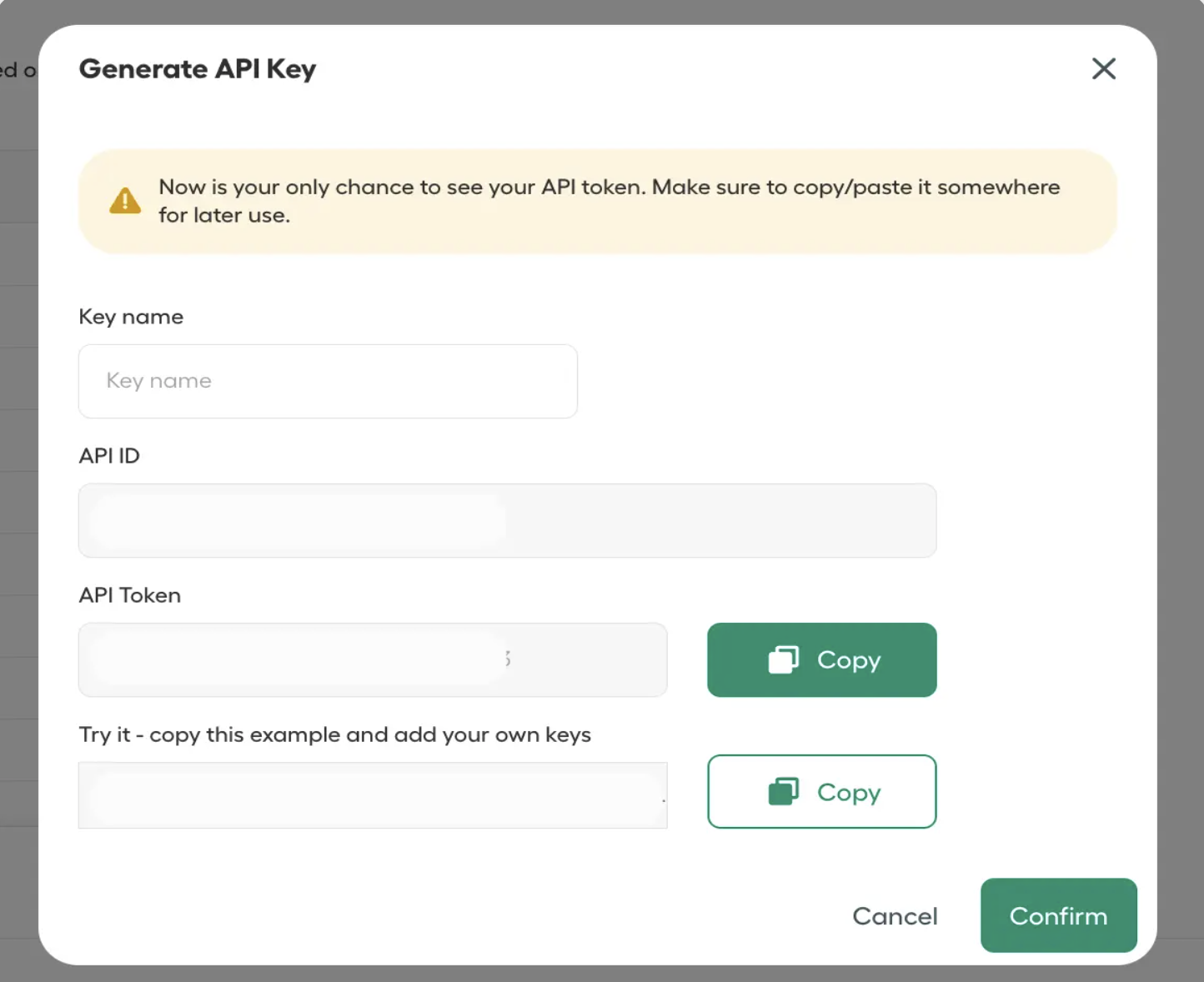
4. Click **Generate an API key** (a popup window will appear).
5. Enter a key name and copy the **API ID** and **API Token**.
Make sure to copy and store your API Credentials immediately after generation, as you won't be able to retrieve it later.
 ## Add API Credentials to Momentum
1. Copy the [generated API Credentials](#generate-your-aircall-api-credentials) from Aircall.
2. Switch to your Momentum admin dashboard.
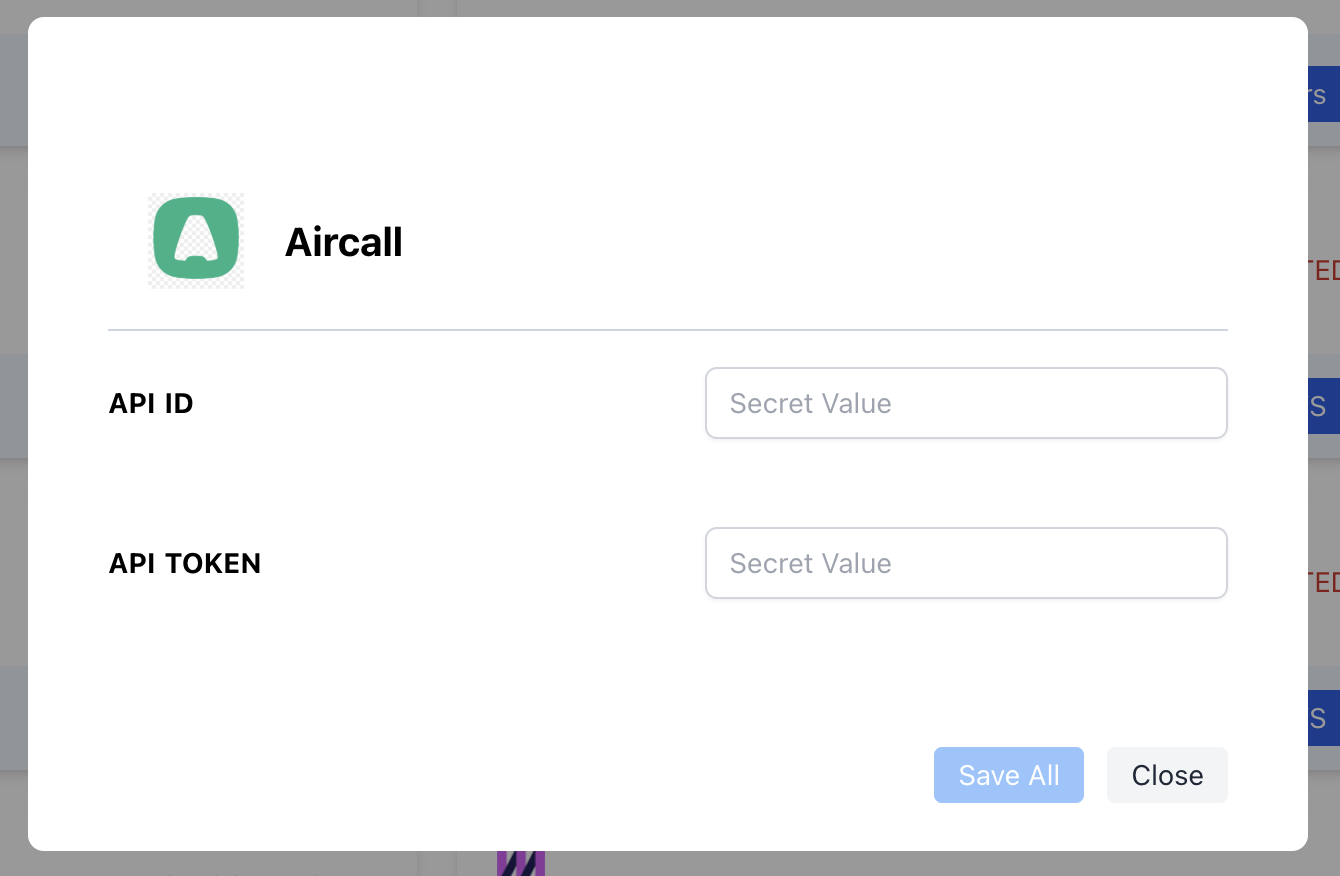
3. Find the Aircall integration tile, paste the API ID and API Token and save.
## Add API Credentials to Momentum
1. Copy the [generated API Credentials](#generate-your-aircall-api-credentials) from Aircall.
2. Switch to your Momentum admin dashboard.
3. Find the Aircall integration tile, paste the API ID and API Token and save.
 Your integration is now successfully completed!
## Where to Find Calls
* Open the Call Library in Momentum to browse and search Aircall calls.
## Assign AI License Seats
To add users to the AI license seats setting in Momentum:
1. Log in to the [Momentum admin](https://app.momentum.io/admin/team) page.
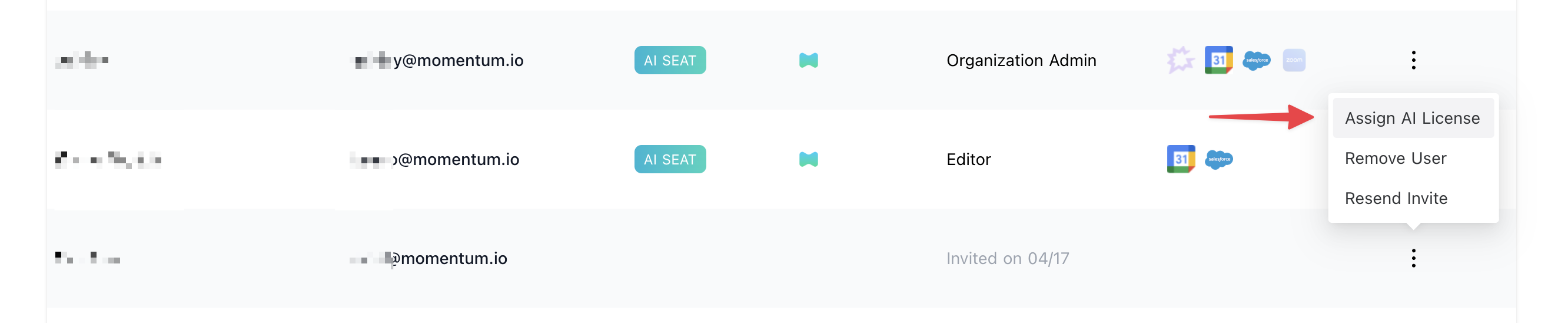
2. In the Team section, invite or locate users to license.
3. Click **Assign AI License** for each user.
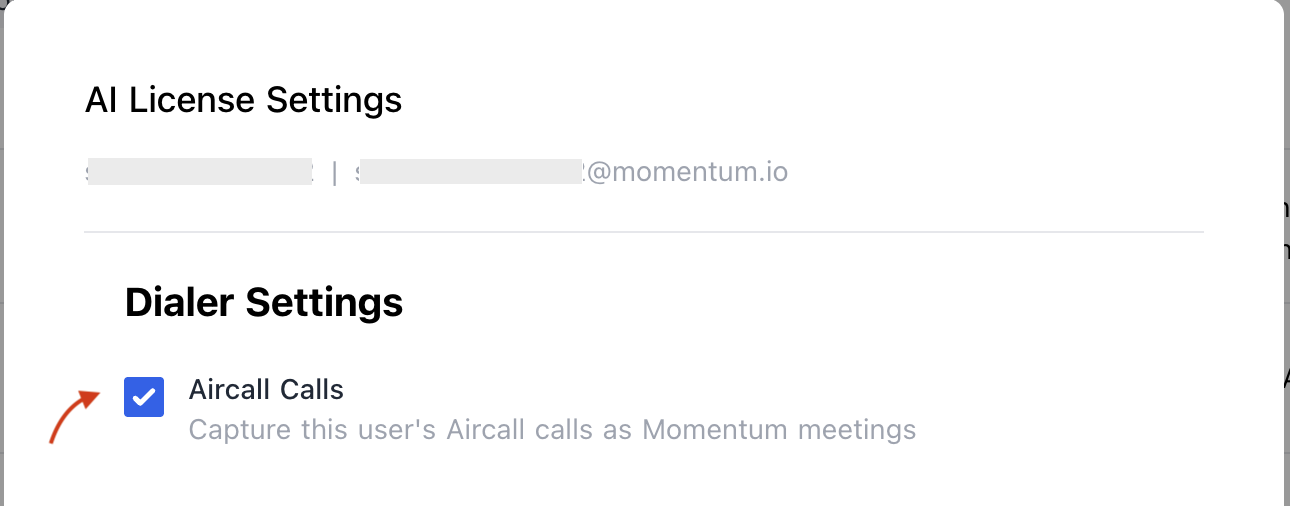
4. Enable **Aircall calls** to sync calls of the user.
Your integration is now successfully completed!
## Where to Find Calls
* Open the Call Library in Momentum to browse and search Aircall calls.
## Assign AI License Seats
To add users to the AI license seats setting in Momentum:
1. Log in to the [Momentum admin](https://app.momentum.io/admin/team) page.
2. In the Team section, invite or locate users to license.
3. Click **Assign AI License** for each user.
4. Enable **Aircall calls** to sync calls of the user.
 ## Troubleshooting
If you encounter issues, contact our support team:
* Slack: Use your shared Momentum channel
* Email: [support@momentum.io](mailto:support@momentum.io)
## FAQs
You'll need to update the credentials in Momentum's integration settings to maintain the connection.
By default, ingestion starts after connection. Contact Momentum support for historical backfill requests.
Salesforce integration is strongly recommended. While calls are ingested directly from Aircall's API, Momentum uses Salesforce records (Tasks or Aircall Voice objects) to map calls to the correct accounts, contacts, and opportunities. Without Salesforce, calls will still appear in your Call Library but won't be attributed to CRM records.
Check that your Aircall integration settings have call types set to "completed" or "in progress", and ensure the Type field is visible on the Task object.
## Troubleshooting
If you encounter issues, contact our support team:
* Slack: Use your shared Momentum channel
* Email: [support@momentum.io](mailto:support@momentum.io)
## FAQs
You'll need to update the credentials in Momentum's integration settings to maintain the connection.
By default, ingestion starts after connection. Contact Momentum support for historical backfill requests.
Salesforce integration is strongly recommended. While calls are ingested directly from Aircall's API, Momentum uses Salesforce records (Tasks or Aircall Voice objects) to map calls to the correct accounts, contacts, and opportunities. Without Salesforce, calls will still appear in your Call Library but won't be attributed to CRM records.
Check that your Aircall integration settings have call types set to "completed" or "in progress", and ensure the Type field is visible on the Task object.