> ## Documentation Index
> Fetch the complete documentation index at: https://docs.momentum.io/llms.txt
> Use this file to discover all available pages before exploring further.
# Coaching Agent Competencies
> Learn how to create and configure competencies for Coaching Agent evaluations.
# Coaching Agent Competencies
Competencies are the foundation of Momentum's Coaching Agent system. Each competency represents a specific skill or behavior you want to evaluate across your sales team. This guide walks you through creating, configuring, and managing competencies to ensure your coaching program aligns with your sales methodology and goals.
## Understanding Competencies
A **competency** is a measurable skill or behavior that Momentum evaluates on sales calls. Examples include:
* Discovery questioning techniques
* Objection handling skills
* Value proposition delivery
* Closing effectiveness
* Relationship building
* Active listening
* Negotiation skills
Each competency is defined by:
* **Competency Title**: Clear name identifying the skill being measured
* **Prompt**: Detailed instructions that guide the AI evaluation process
* **Aggregation Method**: Choice between Core Skills (continuous tracking) or Stage Based Skills (context-specific evaluation)
* **Conditional Logic**: CRM-based filters that determine when the competency is evaluated
## Creating a New Competency
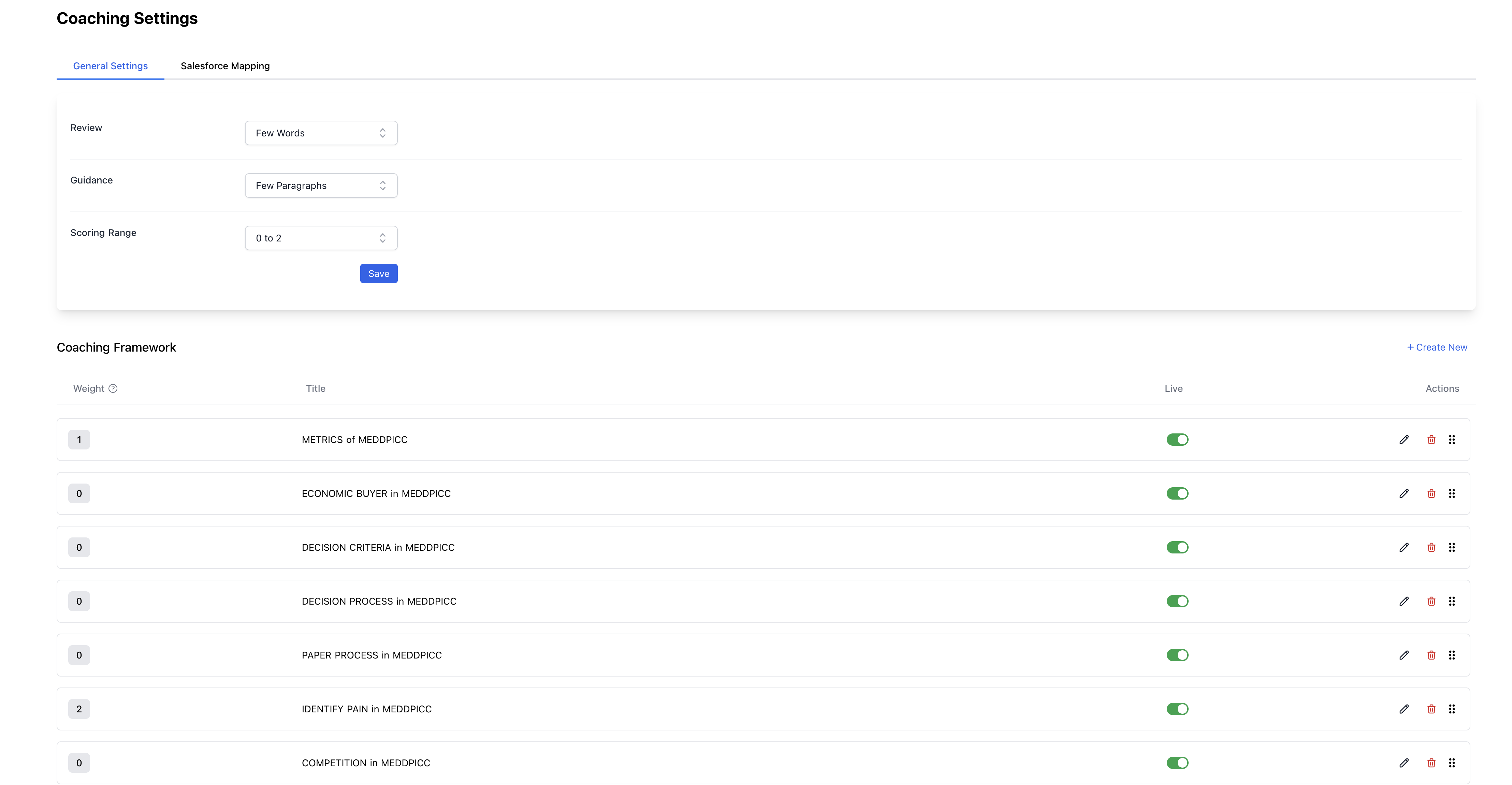
### Step 1: Access Competency Management
1. Navigate to **Admin Settings** in your Momentum dashboard
2. Select **Coaching Agent** from the configuration menu
3. Click **Competencies** to view your current competency library
4. Select **+ Create New Competency**
 ### Step 2: Complete the Competency Form
When creating a new competency, you'll see the competency creation dialog with several key sections:
### Step 2: Complete the Competency Form
When creating a new competency, you'll see the competency creation dialog with several key sections:
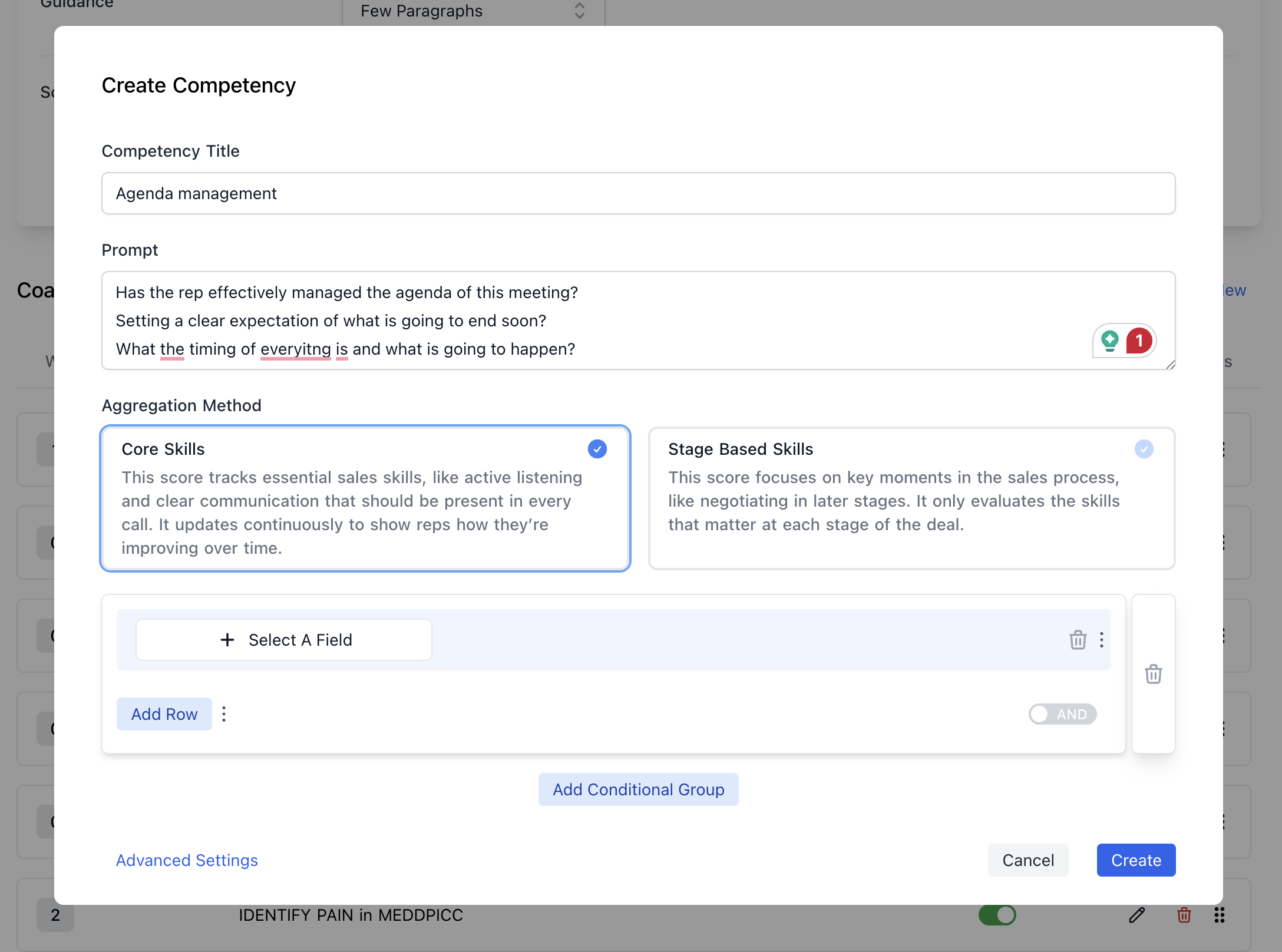 **Competency Title**
* Enter a clear, descriptive name (e.g., "Agenda Management," "Discovery Questioning")
* Use specific titles that clearly indicate the skill being evaluated
**Prompt**
* Write detailed instructions for the AI on what to evaluate
* Include specific behaviors, outcomes, and success criteria
* Be explicit about what constitutes excellent vs. satisfactory performance
### Step 3: Choose Aggregation Method
Select how this competency should be scored and tracked:
**Core Skills**
* Tracks essential sales skills that should be present in every call
* Provides continuous scoring to show improvement over time
* Best for fundamental competencies like active listening, communication clarity
**Stage Based Skills**
* Focuses on specific moments in the sales process
* Only evaluates skills relevant to particular deal stages
* Ideal for competencies like negotiation (late stage) or discovery (early stage)
**Writing Effective Prompts**
Based on the UI, your prompt should be comprehensive and include specific evaluation criteria. Here's an example from the interface:
**Example: Agenda Management Competency**
```
Has the rep effectively managed the agenda of this meeting?
Setting a clear expectation of what is going to end soon?
What the timing of everything is and what is going to happen?
```
**Best Practices for Prompt Writing:**
* **Be Specific**: Define exactly what behaviors or actions you want evaluated
* **Include Multiple Criteria**: Ask several related questions to ensure comprehensive evaluation
* **Use Clear Language**: Write prompts that leave little room for interpretation
* **Focus on Observable Behaviors**: Evaluate what can be heard/seen in the conversation
**Template Structure:**
```
[Main Question]: Has the rep effectively [specific skill/behavior]?
[Supporting Questions]:
- [Specific aspect 1 to evaluate]
- [Specific aspect 2 to evaluate]
- [Specific aspect 3 to evaluate]
```
#### Need Help with Competency Design?
Our Customer Success team has developed proven prompt templates for common sales competencies including discovery questioning, objection handling, presentation skills, and relationship building. If you'd like assistance crafting effective prompts for your specific sales methodology, reach out to your CSM or support team for guidance and examples.
### Step 4: Configure Conditional Logic
Use the conditional logic section to specify when this competency should be evaluated:
**Adding Conditions**
1. Click **Select A Field** to choose a CRM field for filtering
2. Set the condition value (e.g., opportunity stage, deal amount, account type)
3. Use **Add Row** to include additional conditions within the same group
4. Toggle between **AND/OR** logic to refine your targeting
**Creating Conditional Groups**
* Use **Add Conditional Group** for complex filtering scenarios
* Combine multiple groups with different logic operators
* Create sophisticated rules like: "(Stage = Discovery OR Stage = Qualification) AND (Amount > \$50,000)"
**Common Filtering Examples:**
* **Discovery competencies**: Only evaluate when Opportunity Stage = "Discovery" or "Qualification"
* **Enterprise skills**: Only assess when Account Type = "Enterprise" and Amount > \$100,000
* **Product-specific**: Evaluate different competencies based on Product Family or Solution Type
The conditional logic ensures competencies are only scored on relevant calls, making your coaching data more meaningful and actionable.
### CRM Field Mapping Configuration
Install the [Momentum Coaching package](https://api.momentum.io/integration/salesforce/install?package=coaching) to automatically create objects and fields for storing Coaching data in Salesforce
For a sandbox environment, [Momentum Coaching sandbox package](https://api.momentum.io/integration/salesforce/install?package=coaching\&sandbox=1)
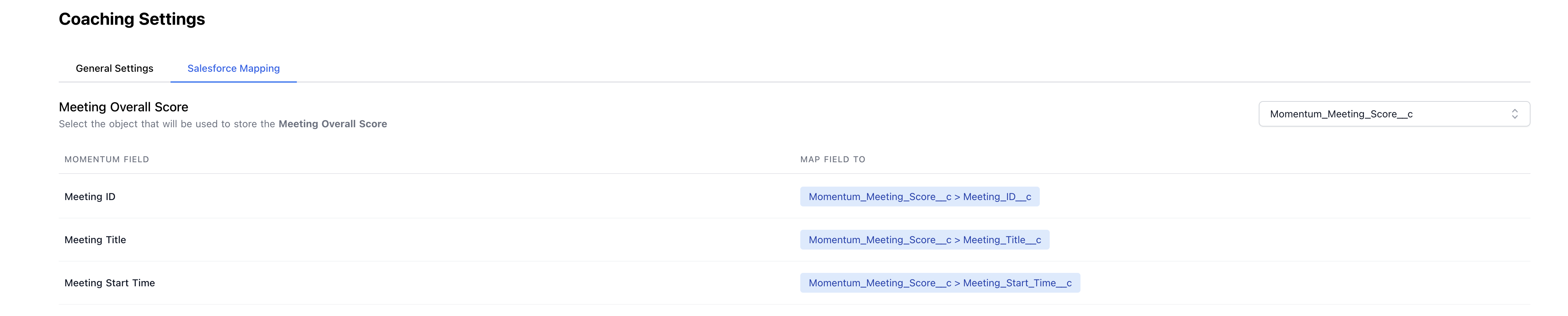
Configure how competency and meeting scores are mapped to your CRM fields:
**Meeting Score Mapping**
Set up overall meeting evaluation scores to flow into designated CRM fields:
**Competency Title**
* Enter a clear, descriptive name (e.g., "Agenda Management," "Discovery Questioning")
* Use specific titles that clearly indicate the skill being evaluated
**Prompt**
* Write detailed instructions for the AI on what to evaluate
* Include specific behaviors, outcomes, and success criteria
* Be explicit about what constitutes excellent vs. satisfactory performance
### Step 3: Choose Aggregation Method
Select how this competency should be scored and tracked:
**Core Skills**
* Tracks essential sales skills that should be present in every call
* Provides continuous scoring to show improvement over time
* Best for fundamental competencies like active listening, communication clarity
**Stage Based Skills**
* Focuses on specific moments in the sales process
* Only evaluates skills relevant to particular deal stages
* Ideal for competencies like negotiation (late stage) or discovery (early stage)
**Writing Effective Prompts**
Based on the UI, your prompt should be comprehensive and include specific evaluation criteria. Here's an example from the interface:
**Example: Agenda Management Competency**
```
Has the rep effectively managed the agenda of this meeting?
Setting a clear expectation of what is going to end soon?
What the timing of everything is and what is going to happen?
```
**Best Practices for Prompt Writing:**
* **Be Specific**: Define exactly what behaviors or actions you want evaluated
* **Include Multiple Criteria**: Ask several related questions to ensure comprehensive evaluation
* **Use Clear Language**: Write prompts that leave little room for interpretation
* **Focus on Observable Behaviors**: Evaluate what can be heard/seen in the conversation
**Template Structure:**
```
[Main Question]: Has the rep effectively [specific skill/behavior]?
[Supporting Questions]:
- [Specific aspect 1 to evaluate]
- [Specific aspect 2 to evaluate]
- [Specific aspect 3 to evaluate]
```
#### Need Help with Competency Design?
Our Customer Success team has developed proven prompt templates for common sales competencies including discovery questioning, objection handling, presentation skills, and relationship building. If you'd like assistance crafting effective prompts for your specific sales methodology, reach out to your CSM or support team for guidance and examples.
### Step 4: Configure Conditional Logic
Use the conditional logic section to specify when this competency should be evaluated:
**Adding Conditions**
1. Click **Select A Field** to choose a CRM field for filtering
2. Set the condition value (e.g., opportunity stage, deal amount, account type)
3. Use **Add Row** to include additional conditions within the same group
4. Toggle between **AND/OR** logic to refine your targeting
**Creating Conditional Groups**
* Use **Add Conditional Group** for complex filtering scenarios
* Combine multiple groups with different logic operators
* Create sophisticated rules like: "(Stage = Discovery OR Stage = Qualification) AND (Amount > \$50,000)"
**Common Filtering Examples:**
* **Discovery competencies**: Only evaluate when Opportunity Stage = "Discovery" or "Qualification"
* **Enterprise skills**: Only assess when Account Type = "Enterprise" and Amount > \$100,000
* **Product-specific**: Evaluate different competencies based on Product Family or Solution Type
The conditional logic ensures competencies are only scored on relevant calls, making your coaching data more meaningful and actionable.
### CRM Field Mapping Configuration
Install the [Momentum Coaching package](https://api.momentum.io/integration/salesforce/install?package=coaching) to automatically create objects and fields for storing Coaching data in Salesforce
For a sandbox environment, [Momentum Coaching sandbox package](https://api.momentum.io/integration/salesforce/install?package=coaching\&sandbox=1)
Configure how competency and meeting scores are mapped to your CRM fields:
**Meeting Score Mapping**
Set up overall meeting evaluation scores to flow into designated CRM fields:
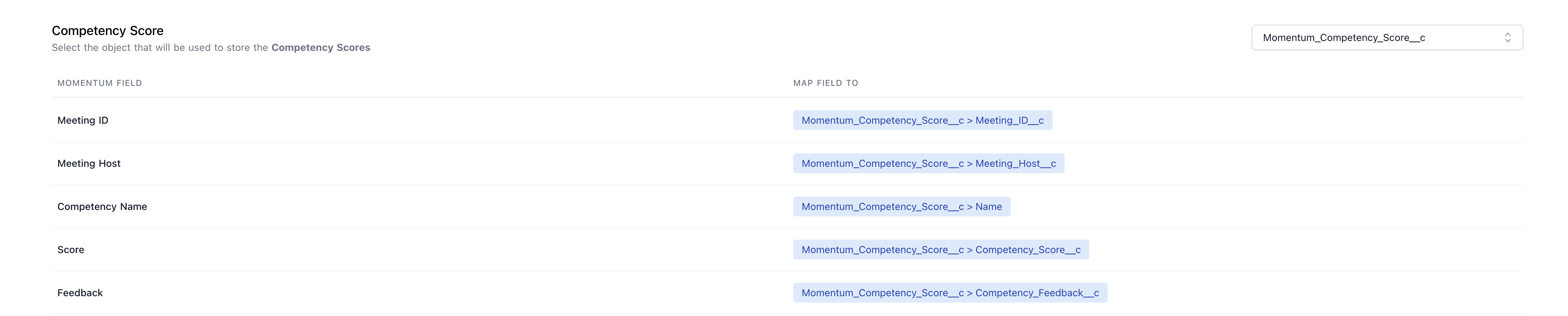
 **Competency Score Mapping**\
Configure individual competency scores to be written to specific CRM objects and fields:
**Competency Score Mapping**\
Configure individual competency scores to be written to specific CRM objects and fields:
 ## Managing Your Competency Library
### Organizing Competencies
**Use Categories Effectively**
* Group related competencies together
* Create categories that align with your sales process
* Consider competency maturity levels (beginner, intermediate, advanced)
**Naming Conventions**
* Establish consistent naming patterns
* Include target audience in names when relevant
* Use descriptive names that team members will understand
### Monitoring Competency Performance
**Regular Review Process**
* Monitor competency scoring distributions
* Look for competencies that consistently score too high or too low
* Review qualitative feedback for relevance and usefulness
**Refinement and Optimization**
* Update prompts based on team feedback
* Adjust CRM filters as your sales process evolves
* Archive outdated competencies rather than deleting them
**Team Feedback Integration**
* Regularly collect feedback from sales reps and managers
* Adjust competency criteria based on real-world application
* Ensure competencies remain aligned with current sales strategies
## Best Practices for Competency Configuration
### Starting Your Competency Program
1. **Begin with Core Competencies**: Start with 5-7 fundamental competencies
2. **Align with Sales Process**: Map competencies to your existing sales methodology
3. **Get Team Input**: Involve sales managers in competency design
4. **Test Gradually**: Roll out competencies to a pilot group first
### Scaling Your Program
1. **Add Competencies Incrementally**: Introduce new competencies monthly
2. **Specialize by Role**: Create role-specific competencies for different team members
3. **Advanced Filtering**: Use sophisticated CRM filters for precise targeting
4. **Integration Focus**: Ensure coaching data flows effectively into your reporting systems
### Avoiding Common Pitfalls
* **Don't Over-Engineer**: Keep prompts clear and focused
* **Avoid Overlap**: Ensure competencies measure distinct skills
* **Regular Maintenance**: Update competencies as your sales process evolves
* **Team Buy-In**: Ensure the sales team understands and values the competencies
By carefully configuring your competencies, you'll create a comprehensive coaching program that provides valuable insights while remaining practical and actionable for your sales team. Remember that competency design is iterative - start with solid fundamentals and refine based on results and feedback.
The combination of thoughtful competency design and proper CRM integration ensures that your Coaching Agent implementation delivers maximum value to both individual representatives and the broader sales organization.
## Managing Your Competency Library
### Organizing Competencies
**Use Categories Effectively**
* Group related competencies together
* Create categories that align with your sales process
* Consider competency maturity levels (beginner, intermediate, advanced)
**Naming Conventions**
* Establish consistent naming patterns
* Include target audience in names when relevant
* Use descriptive names that team members will understand
### Monitoring Competency Performance
**Regular Review Process**
* Monitor competency scoring distributions
* Look for competencies that consistently score too high or too low
* Review qualitative feedback for relevance and usefulness
**Refinement and Optimization**
* Update prompts based on team feedback
* Adjust CRM filters as your sales process evolves
* Archive outdated competencies rather than deleting them
**Team Feedback Integration**
* Regularly collect feedback from sales reps and managers
* Adjust competency criteria based on real-world application
* Ensure competencies remain aligned with current sales strategies
## Best Practices for Competency Configuration
### Starting Your Competency Program
1. **Begin with Core Competencies**: Start with 5-7 fundamental competencies
2. **Align with Sales Process**: Map competencies to your existing sales methodology
3. **Get Team Input**: Involve sales managers in competency design
4. **Test Gradually**: Roll out competencies to a pilot group first
### Scaling Your Program
1. **Add Competencies Incrementally**: Introduce new competencies monthly
2. **Specialize by Role**: Create role-specific competencies for different team members
3. **Advanced Filtering**: Use sophisticated CRM filters for precise targeting
4. **Integration Focus**: Ensure coaching data flows effectively into your reporting systems
### Avoiding Common Pitfalls
* **Don't Over-Engineer**: Keep prompts clear and focused
* **Avoid Overlap**: Ensure competencies measure distinct skills
* **Regular Maintenance**: Update competencies as your sales process evolves
* **Team Buy-In**: Ensure the sales team understands and values the competencies
By carefully configuring your competencies, you'll create a comprehensive coaching program that provides valuable insights while remaining practical and actionable for your sales team. Remember that competency design is iterative - start with solid fundamentals and refine based on results and feedback.
The combination of thoughtful competency design and proper CRM integration ensures that your Coaching Agent implementation delivers maximum value to both individual representatives and the broader sales organization.